Drainage areas from the plan
Closed PRE and POST polylines become catchments. Hydrologic soils and land use overlay automatically. Each card shows composite CN, Rational C, area, and time of concentration.
Civil 3D 2027 companion
StormDesigner reads closed polylines from Civil 3D and uses them to size drainage areas, ditches, and pipes. Rainfall, soils, and the calculation report stay in one project file, so a grading change is a sync and a recalculation, not a new takeoff.
Methods are the ones already used on North Carolina site plans: Rational and SCS, NOAA Atlas 14 rainfall, and USDA SSURGO soils.
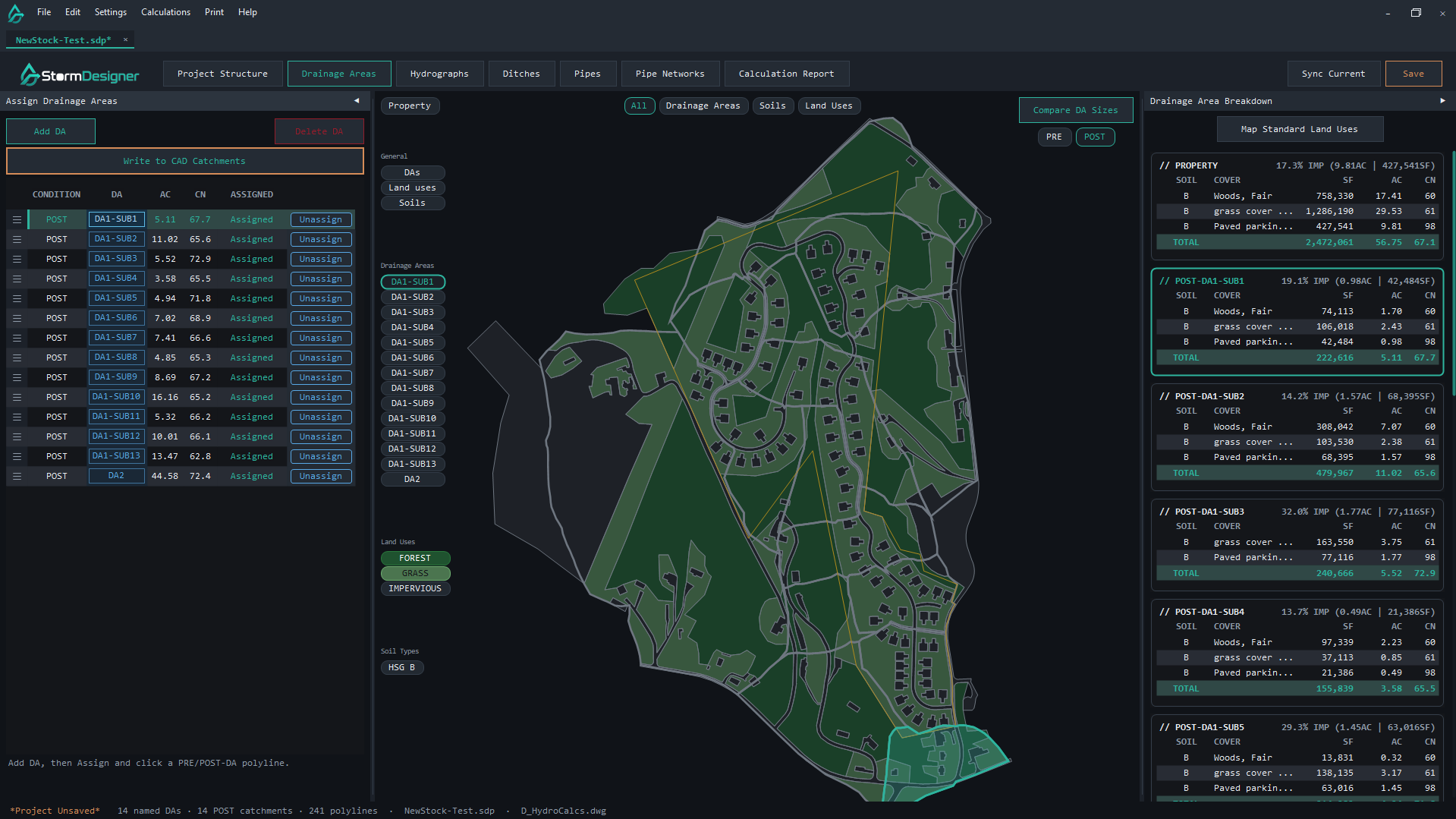
Closed PRE and POST polylines become catchments. Hydrologic soils and land use overlay automatically. Each card shows composite CN, Rational C, area, and time of concentration.
After a grading revision, sync the drawing again. Assigned ditches, pipes, and report pages follow the updated geometry instead of a rebuilt drainage study.
The project file stores the last sync. You can keep designing in StormDesigner after Civil 3D is shut down, then sync again when the drawing is open.
Workflow
Place closed polylines on the C-HYDR layers used for PRE-DA, POST-DA, soils, and inlets.
Sync the open drawing, or read the remaining DWGs from disk. The project file caches the rings so the desktop app can keep working after Civil 3D closes.
Assign catchments, load NOAA Atlas 14 rainfall, import USDA soils, size ditches and pipes, and assemble the calculation report in the same window.
Calculation report
Title page, narrative, rainfall, soils, drainage areas, and conveyance tables — the same order the desktop report exports. Rainfall and soils below are NOAA Atlas 14 and USDA SSURGO for a point in Asheville. Catchment geometry is invented.
Appendix · Drainage areas
Point precipitation — Atlas 14 depths (in)
| Duration | 2-yr | 10-yr | 25-yr | 100-yr |
|---|---|---|---|---|
| 15-min | 0.80 | 1.09 | 1.25 | 1.48 |
| 60-min | 1.38 | 2.05 | 2.46 | 3.13 |
| 24-hr | 2.63 | 3.75 | 4.43 | 5.51 |
Catchments — Rational Q10 = C × I × A
| DA | Area ac | CN | C | Tc min | I10 in/hr | Q10 cfs |
|---|---|---|---|---|---|---|
| PRE-1 | 2.40 | 55 | 0.20 | 18 | 4.11 | 1.97 |
| PRE-2 | 1.80 | 55 | 0.20 | 16 | 4.27 | 1.54 |
| PRE-3 | 1.10 | 58 | 0.25 | 14 | 4.49 | 1.23 |
| POST-1 | 2.40 | 69 | 0.38 | 12 | 4.78 | 4.36 |
| POST-2 | 1.80 | 64 | 0.33 | 11 | 4.96 | 2.95 |
| POST-3 | 1.10 | 73 | 0.44 | 10 | 5.15 | 2.49 |
| Area ac | CN | Q10 cfs | 10-yr runoff in | 10-yr vol ac-ft | |
|---|---|---|---|---|---|
| PRE total | 5.30 | 56 | 4.74 | 0.47 | 0.21 |
| POST total | 5.30 | 68 | 9.80 | 1.05 | 0.46 |
I10 is Atlas 14 PDS intensity at Tc (log-log between published durations). Runoff depth is SCS CN, P = 3.75 in, Ia = 0.2S. PRE land cover is woods/meadow on HSG B. POST is open space and 1/2- to 1/3-acre residential on the same soils. Sample geometry only — not a real project.
Pricing
Designer is one seat. Studio is ten. Firm is twenty-five. Each plan is billed once a year.